If you’re in the market for a NAS, then chances are you’ve been looking at Synology as one of your options. The company makes a wide variety of flexible NAS solutions, and their latest offering is the 4-bay Synology DiskStation DS923+.
While the appearance of the DS923+ remains unchanged, under the hood there are a number of tweaks that set it apart from previous generations. At the same time, there are still some hardware choices that play against this NAS, making it a mixed recommendation despite its strong software features. It all boils down to what your use-scenario is going to be, as the DS923+ is more than capable of filling several utility roles on your network.
Design and Features
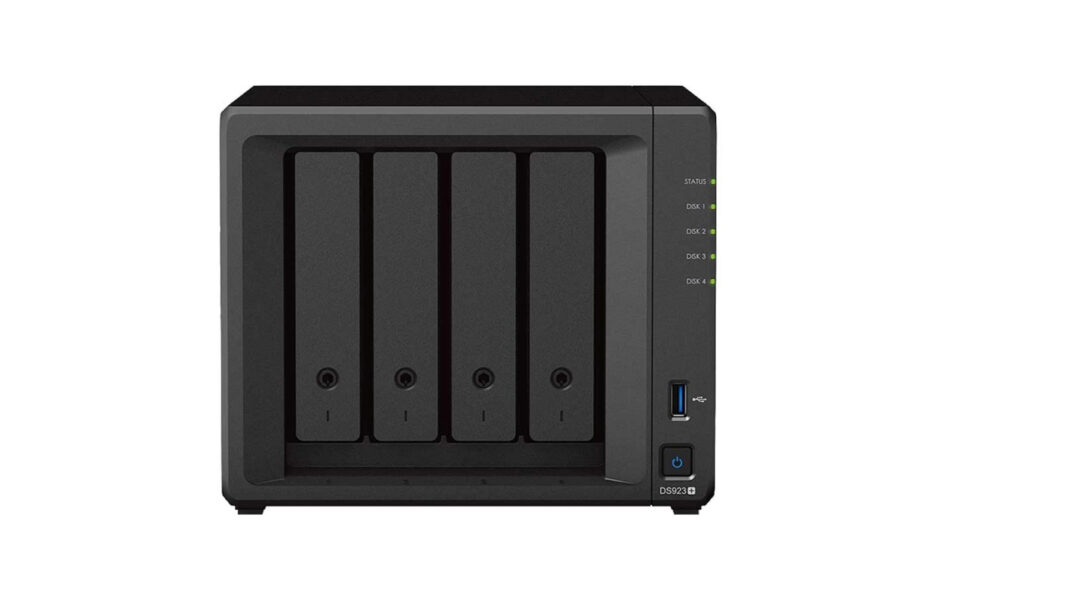
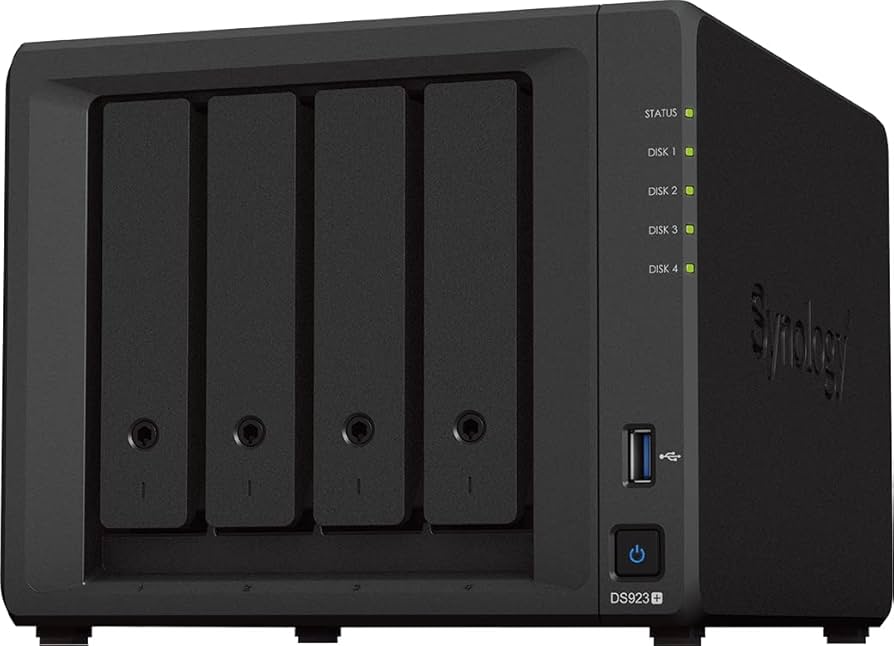
The DS923+ looks like any other Synology NAS, with four drive bays at the front of the device. The bays are all toolless, so if you’re using 3.5” drives you simply drop them into a bay and slide it back into the enclosure. 2.5” drives can also be used, but must be screwed in with the included screws. The DS923+ supports a single volume of a maximum of 108TB, which is more storage than you’ll really ever need. At the front you’ll also find the power button, status LEDs, and a single USB 3.2 Gen 1 port. You can use this USB port to connect USB drives to quickly transfer data, or connect a printer to share it on the network through the NAS.
At the back you’ll find two large fans to keep the NAS cool, as well as another USB port, power port, and an eSATA expansion slot to connect a compatible Synology expansion module to increase the number of drives and storage. There are also two 1GbE RJ-45 ports, which can be used separately or in unison for failover purposes. It’s slightly disappointing that these aren’t 2.5GbE ports instead, as it almost feels like 1GbE is a bit of a cop-out, given the potential of this NAS. However as a compromise, the DS923+ does offer an optional 10GbE expansion card, which is easy to slot in at the back for faster network speeds. This does add an additional cost to your overall investment, but the card can be used in future NAS models as well, making it easy to swap into other enclosures at will.
Underneath you’ll find two NVMe slots, which are again toolless. Depending on the number of drives installed in these slots, you can create read and write caches for one of your storage volumes, thus increasing overall performance. However with the DS923+, Synology also allows these NVMe drives to be turned into a storage pool of their own, though there is a single caveat – you must use only Synology NVMe drives. This immediately puts things at a disadvantage, though Synology have said that this is purely to ensure best compatibility and performance. Still, this is likely to irk most users who probably have their own set of drives to use in this NAS.
Internally Synology have gone for an AMD processor in this model, mainly the AMD Ryzen R1600 which is a 2-core, 4-thread CPU with a 2.6GHz base frequency. It’s not the first time we’ve seen a Synology NAS with an AMD CPU, but there are a few performance and power trade-offs compared to the choice of an Intel CPU.
The DS923+ comes with 4GB of DDR4 ECC RAM, but the system can support a maximum of 32 GB (16 GB x 2 modules). The RAM modules are easily accessible inside once the drive bays are removed, and this increase in RAM is definitely beneficial if you’re going to be running a lot of apps on this NAS. Again, Synology does recommend its own brand of RAM modules for best compatibility, but these can start from around $300 upwards, further adding to costs.
Software and Setup
Certainly one of the biggest perks of a Synology NAS is how easy it is to set up. The system’s DSM software is very easy to follow through, so even first-time NAS users will have no problems configuring their NAS to their needs. For our tests, we used two WD Red 4TB drives in Btrfs format with Synology Hybrid RAID. We also set up our two 400GB Synology NVMe drives into a storage pool of their own, just to compare what performance would be like versus traditional hard drives.
Once you’ve installed DSM onto your NAS and set up some basic user accounts and permissions, you can decide what exactly you want to use your NAS for. Out of the box it works great simply as a network storage solution, but Synology’s Package Center offers an impressive array of applications that can easily run on the DS923+. One of the first packages we installed was Docker, which allows you to run various single-use applications from your NAS. With the ability to expand your RAM to much larger amounts, you can use the DS923+ to run various smaller tasks together, though trying to run a full OS through Docker far exceeds its capabilities, so you’re better off using the Virtual Machine Manager application instead for advanced scenarios. The DS923+ can also function as a steady backup server through Synology’s own software, which can easily be deployed to computers on your network.
Other applications are geared toward home use, such as Synology Photos which allows you to backup and sync your photos for free from your devices. Plex is another great add-on to have, though you should be aware of some performance issues in the next section. There is also the ability to turn this NAS into a surveillance storage system with compatible IP cameras. Overall, the DS923+ is a very flexible NAS with a myriad of uses, so it should be relatively easy to decide what you want to use it for.
Performance
As a core file server, the DS923+ does exceptionally well. Large file transfers copied across to the HDD raid at around 108MB/s, while file copies of mixed sizes dropped down to around 95MB/s. These were only marginally faster when copied to the NVMe array, with large files moving across at 112MB/s and smaller mixed files capping at 101MB/s. Most applications launched quickly and ran without any issues, and we had no problem running several Docker containers which had no adverse effect on file transfer speeds.
One area we did spend some time on was with running the DS923+ as a Plex and general media server. Since this NAS uses an AMD CPU, there’s no internal GPU such as the one included on models with an Intel chip. Therefore, you have to be aware of what this NAS can and cannot do when it comes to media streaming. Because of the lack of an on-board GPU, the DS923+ does not do well when it comes to server-side transcoding. We played a 4k file through Plex on a web browser, and it played for about eight seconds before pausing to buffer. When we asked Plex to downgrade this to 1080p at 20Mbps, it played for around forty seconds before needing to pause and buffer again.
If you’re running Plex on a device that’s capable of transcoding on the client side such as an Apple TV or Nvidia Shield, you’ll probably run into less problems. But if you’re viewing your Plex library on a less powerful device or a web browser, you’ll run into a number of problems when trying to stream or transcode any videos with a higher resolution or bitrate. If your video collection is primary 1080p content then you should be fine – anything more demanding than that will likely introduce problems during playback. Similarly with Synology’s own Video Station software, we ran into buffering issues constantly when viewing 2k and 4k content from the DS923+.
Verdict: Good for storage and apps
The Synology DiskStation DS923+ excels at being used as a central file repository, or for running several business applications and backup programs with ease. It’s got plenty of room to grow with your needs, and Synology’s excellent DSM software makes it easy to keep things in check. Some users may find it annoying that Synology has locked NVMe storage pools to only first-party drives, but we’re hoping that this changes in the near future.
As a media server the DS923+ is a bit wobbly at times, but only if your content has a high bitrate or a resolution larger than 1080p. For some video enthusiasts this might be a deal-breaker, but for an average video collection that probably won’t contain too many high-resolution files, this might not be the case. It’s still worth keeping in mind that even 1080p clips can cause some playback problems when encoded with the HEVC codec. Then there’s the use of 1GbE ports versus 2.5GbE ports on this model, even considering the optional network upgrade card. Overall however, the DS923+ is still a strong NAS with plenty of uses that can easily grow with your needs.
- Extremely easy to configure
- Future-proof expansion
- Excellent software features
- Limited to 1Gbps ports
- Plex transcoding can be problematic
- Reliance on first-party drives
The DS923+ is a very capable NAS for storing and quickly accessing large amounts of files, as well as offering plenty of upgrade flexibility. Certain hardware choices may hold it back, and media performance is worth noting.