Synology have been putting out some really decent NAS systems in the past year or so, but the company hasn’t been flooding the market with their models. Instead they’ve been focusing on improving the software that runs them, which to date has been one of the most efficient software suites I’ve seen running on a NAS. This week I got my hands on the Synology DiskStation DS216+II, which is a 2-bay NAS that in addition to functioning as a regular NAS for backup and file storage, can be used at home as a media server, capable of handling 4k video content.
Build Quality & Design
The DS216+II is a marginal upgrade from the DS216+, the only difference being that the DS216+II now features an dual-core Intel Celeron N3060 processor simply because the previously used chip in the DS216+ was no longer available. So with only a slightly faster processor under the hood, there’s little reason to warrant an upgrade if you’ve got a DS216+ already.
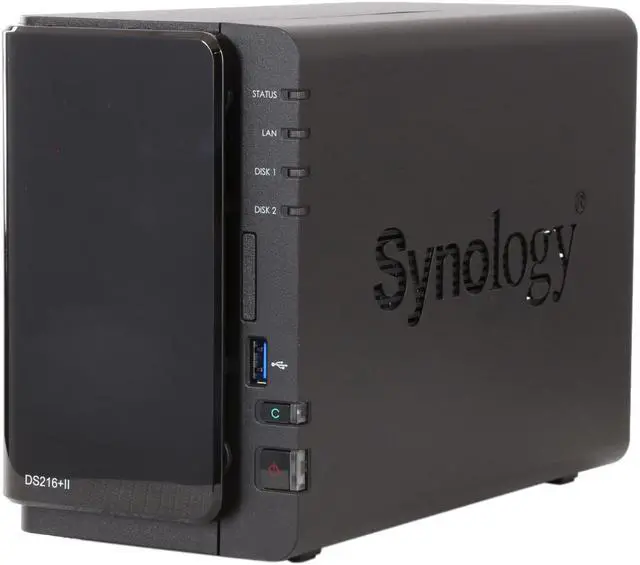
Looks-wise Synology sticks to its regular formula of a plain black chassis, with a glossy front panel that can be easily removed to reveal the 2 HDD bays. Each bay has a removable tray which lets you easily insert a HDD without using a single screw. It’s something I wish all NAS manufacturers would adopt, as I can easily recall several occasions with other NAS systems where I’ve fumbled with screws and aligning things when installing a hard drive.
At the front of the DS216+II you have a row of status LEDs (that can now be dimmed via the software), a USB 3.0 port, a Copy button for quickly transferring files to the NAS, and of course the power button. Round the back you have a single Gigabit Ethernet port, two USB 2.0 ports, and an eSATA port. I really wish that Synology had added in another USB 3.0 port instead of the eSATA port – I really can’t remember the last time I had to use an eSATA port, so perhaps Synology will ditch this in a future model. There’s also 1GB of RAM under the hood, which for average file tasks should be fine, but we’ll see how it fares when we throw some media transcoding at it.
The DS216+II supports a max of 20TB, but I decided to lean on the smaller end of the spectrum and set it up with two 2TB WD Red drives in our review unit, with Synology’s default hybrid file storage system.
Setup & Features
Synology boasts that its NAS systems are super-easy and quick to setup, and there’s truth to this. Physically setting up the DS216+II was a breeze – simply unbox, plug in the LAN and power cable, slide in your HDDs, and power it up. After a few minutes of bootup, you’ll be able to see the DS216+II on your network and can easily finish setting it up through an easy to follow web portal. There are a few extra steps that advanced users can go through regarding RAID setup, but other than this pretty much anyone can set this up without any hassle.
Once up and running you can login to the DS216+II via its dedicated web portal, which launches DSM – Synology’s own OS that powers all of its NAS systems. I’ve talked about DSM in great length in my previous reviews, and really is a very well-built system offering pretty much every feature and service a user could ask for. Out of the box you have some standard apps installed, but you can easily launch Package Manager to install everything from antivirus, mail, VPN, IP Cameras, and much more. DSM is fairly straightforward, but certain elements – like setting up Time Machine Backups – can be a bit daunting to accomplish. For media-hungry users Plex is available to install on the DS216+II, which is a fantastic way to organize and stream your media library natively to the Plex app on a variety of devices. Synology has its own video streaming apps as well as apps to stream your iTunes library and other content, so you’ll spend a good deal of time trying them all out to figure what works best for your setup.
Performance
A single 18GB file transfer showed a transfer speed of about 118MBps, while a second directory transfer of several different files totaling 8GB yielded an average speed of 57MBps, which is a little on the slower side than what I’ve gotten with other Synology systems.
Instead of approaching this as a traditional NAS review, I’m instead opting to treat the DS216+II as a media streaming device, since the ability to handle 4k video content is a major feature for this model. Essentially you can stick 4k video content onto the DS216+II, and it will automatically scale it down to 1080p so you can stream it on most devices and over the web.
Watching content in Full HD is fine, with no frame drops or stutters in audio. Watching content streaming in my browser or on my phone was perfectly fine, even when watching a 2160p video. Having said that, you’re only limited to 30fps – anything higher than that and you’re going to run into delays with audio and video. A short 4-minute 4k clip running at 60fps was really struggling to stream properly, but a similar sized clip that ran at 30fps was much better. There’s no way you’re going to enjoy 4k content running at 30fps, so this is unfortunately where the DS216+II comes up short. Yes, it does handle 4k content, but it does have limitations – possibly due to the shortage of RAM or perhaps in need of an even faster processor. Having said that, if you double-click on a 4k file natively using Windows Explorer, it plays perfectly with zero issues. It’s when the DS216+II tries hard to transcode things so it can stream them that problems pop up. It’s certainly not a deal breaker – watching 4k content via DLNA on my Samsung SUHD TV showed zero problems, and videos played with zero stutter or issues at 60fps.
The Synology DiskStation DS216+II is a very minor upgrade from the DS216+, but for anyone with an older Synology NAS looking for a robust file and media server, this unit ticks both boxes. Yes, there are some transcoding issues that are to be expected when looking at more complex files, but aside from this the DS216+II is a very capable NAS that can fit in perfectly in your home or small business environment. The Synology DiskStation DS216+II is priced at AED 1,098.
- DSM software fairly easy to follow
- Countless software add-ons available
- Quiet operation
- Needs more USB 3.0 ports
- Streaming 60fps 4k files causes problems
The Synology DiskStation DS216+II is a very minor upgrade from the DS216+, but for anyone with an older Synology NAS looking for a robust file and media server, this unit ticks both boxes.